1. Project Overview & Team
SmartPot-IO is an autonomous desktop smart planter engineered at the intersection of embedded hardware engineering and industrial product design[cite: 1]. The primary objective is to prevent root rot and plant dehydration caused by cheap corrosive resistive sensors, offering a seamless, low-maintenance, and aesthetically pleasing plant care experience[cite: 1].
Team & Responsibilities
- Durmuş Efe Özhan (Computer Engineering): Embedded Firmware (C++), Sensor Calibration, I2C Bus Management, State-Machine Architecture, and Power/Battery Circuitry[cite: 1].
- Batu Taşkesen (Industrial Design): Form Ideation, CMF Palette, Enclosure CAD Modeling, Internal Component Packaging, and Tolerance Engineering[cite: 1].
2. Architecture Evolution: From ESP32 Local Server to Standalone OLED Telemetry
During the early prototyping phase, the system underwent a major architectural pivot driven by power efficiency, user experience, and cost tradeoffs.
[Initial Concept] Capacitive Sensor ---> ESP32 (Wi-Fi) ---> Local HTTP Server (HTML Browser GUI) [Final System] Capacitive Sensor ---> Arduino Nano ---> I2C SSD1306 OLED (Instant UI)
Initial Concept: ESP32 + Local IP Web Dashboard
The earliest iteration was designed to broadcast an access point or connect to a local network, serving a lightweight HTML dashboard via a local IP address:
- Why Local IP? To completely avoid recurring domain and cloud hosting fees, minimize third-party backend dependencies, and eliminate setup friction.
- Browser Interface Screenshot:
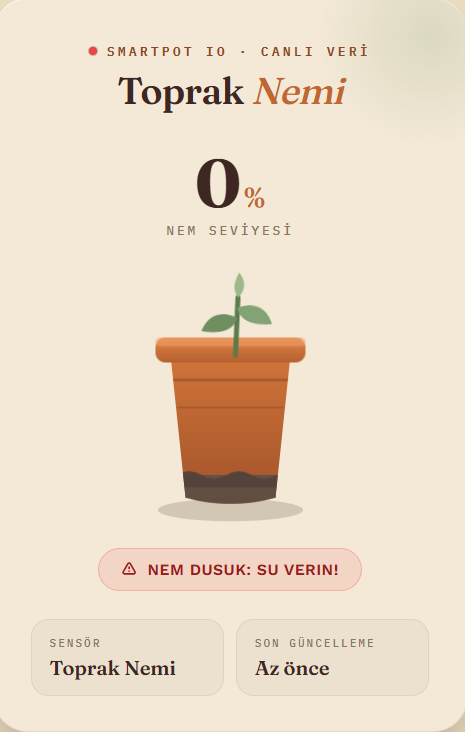
- The Challenge: While cost-effective, opening a browser and navigating to a local IP (
192.168.x.x) created unnecessary friction for a simple glance at plant status on a workspace desk.
The Pivot: Dedicated On-Device Telemetry (OLED + RTC)
To make monitoring instantaneous and frictionless, telemetry was brought directly onto the planter itself:
- Integrated a high-contrast 0.96” SSD1306 OLED for immediate status checks[cite: 1].
- Removed Wi-Fi radio power spikes and network setup overhead by transitioning to an energy-efficient Arduino Nano + DS1307 RTC configuration[cite: 1].
- Achieved vastly extended standalone battery life from a single 18650 Li-ion cell[cite: 1].
3. Operating Modes & State Logic
The firmware operates on a time-aware finite state machine to balance 24/7 root monitoring with battery longevity[cite: 1]:
- Day Mode (06:00 – 23:59): Active live telemetry showing real-time moisture percentage, graphical progress bar, and status labels (
[KURU],[IDEAL],[ISLAK])[cite: 1]. - Night / Sleep Mode (00:00 – 06:00): Conserves battery via a calm sleeping animation while background capacitive sensor polling remains continuously active[cite: 1].
- Critical Night Alert: If soil moisture drops below 30% during sleep hours, the display wakes up immediately with a
[KURU]warning until watered[cite: 1].
4. Industrial Design, Prototyping & CMF Strategy
Led by Batu Taşkesen, the enclosure design harmonizes desk ergonomics with natural interior aesthetics[cite: 1].
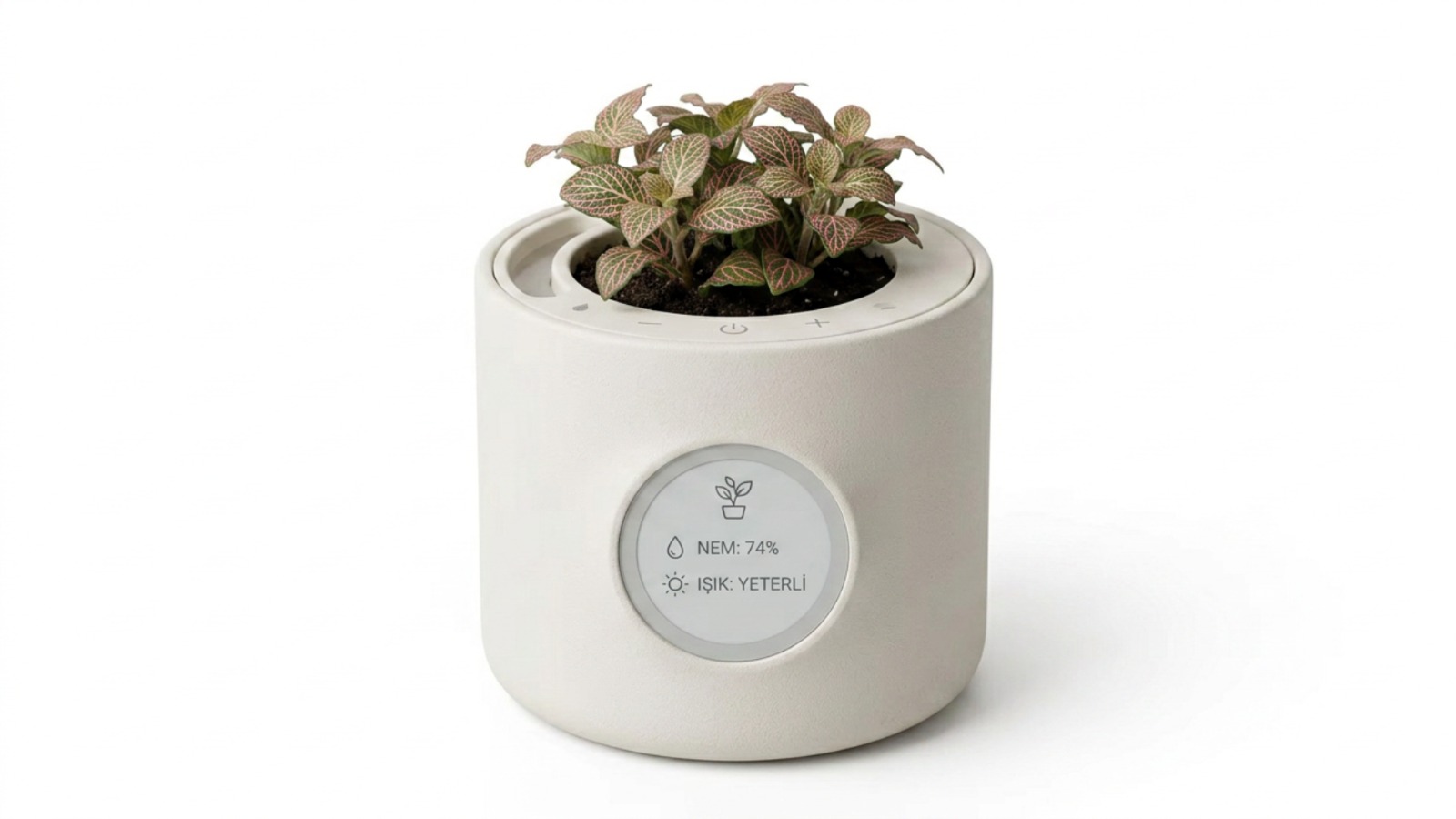
Early Prototyping Stages
Iterative packaging tests were conducted to balance internal component clearance, sensor routing, and overall pot proportions:


CMF Color Palette (Pantone & HEX)
- 🌾 Dried Pampas:
HEX: #D4CFBC|Pantone 4545 C - 🏺 Raw Ochre / Mustard:
HEX: #BA8E4E|Pantone 7556 C - 🧱 Raw Terracotta:
HEX: #B55A44|Pantone 7592 C - 🌿 Muted Moss / Khaki:
HEX: #4F5846|Pantone 7771 C
📑 Interactive Presentation Deck:
📥 Click here to open/download the full SmartPot-IO Design & Engineering Deck (PDF)
5. Open-Source Community Vision & Future Roadmap (DIY / Maker)
SmartPot-IO is planned as a fully open-source hardware and software ecosystem.
- Fabricate Your Own Planter: The goal is to allow anyone to download the CAD/STL models, 3D print the enclosure locally or via desktop 3D printers, source off-the-shelf electronics, and assemble their own custom planter.
- Physical Validation & Fitment Testing: Before releasing final CAD files to the public, tolerances, snapping tabs, and electronics mounting bosses will be validated through our in-house 3D test prints.
- Video & Visual Assembly Guide: Once physical testing concludes, a step-by-step video and illustrated wiring guide covering soldering, pin distribution, firmware flashing, and final enclosure assembly will be published.
6. Links & Resources
- 🐙 Source Code: GitHub - SmartPot-IO
- ⚡ Live Circuit Simulation: Run on Wokwi
- 👤 Durmuş Efe Özhan: LinkedIn • GitHub
- 🎨 Batu Taşkesen: LinkedIn • Behance